

This guide gives you a clear view of back-office logistics automation: the three kinds of automation available, the workflows worth automating first, what to leave with your team, and how to start without a big-bang project.
Warehouse automation or back-office automation?
Search for logistics automation and you find warehouse equipment. You see robots, conveyors, sorters, and automated scanning systems. These tools are for businesses that physically handle high volumes of goods, like 3PLs and fulfilment centres.
A freight forwarder’s automation problem is different. It sits in the back office. Your most repetitive work lives in email, rate sheets, documents, and invoices. The opportunity is not in moving pallets, but in moving information accurately and quickly. The question is not how to automate a warehouse, but how to stop your team from copying the same data from a PDF into a spreadsheet and then into your TMS.
For a freight forwarder, the most valuable logistics automation software addresses the flow of information, not the flow of physical cargo in a shed. For warehouse-specific automation, see warehouse automation for 3PLs.
Three kinds of back-office automation
Not all automation is the same. In a forwarding office, three types of technology handle different kinds of work. Understanding the difference helps you choose the right tool for the right job.
1. Rules-based automation
Rules-based automation follows fixed, if-this-then-that steps. It is cheap, reliable, and perfect for tasks where the input and the desired action are always the same. For example, a rule can file any email with "Booking Confirmation" in the subject line into a specific folder. It can send a template notification when a shipment status changes to "Departed". The weakness of rules is that they break when the input changes. If a carrier sends "Confirmed space" instead, the rule fails.
2. Artificial Intelligence (AI)
AI handles work where the input varies. It reads messages and documents that do not follow a template and pulls out what matters. For example, a customer might email, “Please quote 2 x 40HC from Mundra to Felixstowe, cargo ready 21 October 2026.” AI can read this unstructured text and extract the origin, destination, equipment type, and ready date into structured fields. This is where AI is most useful: turning messy, real-world communication into clean data your other systems can use.
3. AI agents
AI agents take AI a step further. An agent can perform several steps in a row. It gathers context from other systems, like your rate cards, customer history, or live shipment status. It then uses that context to complete a task and hand a finished draft to a person. For example, after reading a quote request, an agent can look up your rates for that lane, check what that customer paid last time, and draft a complete quotation email. Your pricing team then just needs to review and approve it. This is a powerful form of freight forwarding automation. You can learn more about what agentic AI actually does.
Comparison of automation types
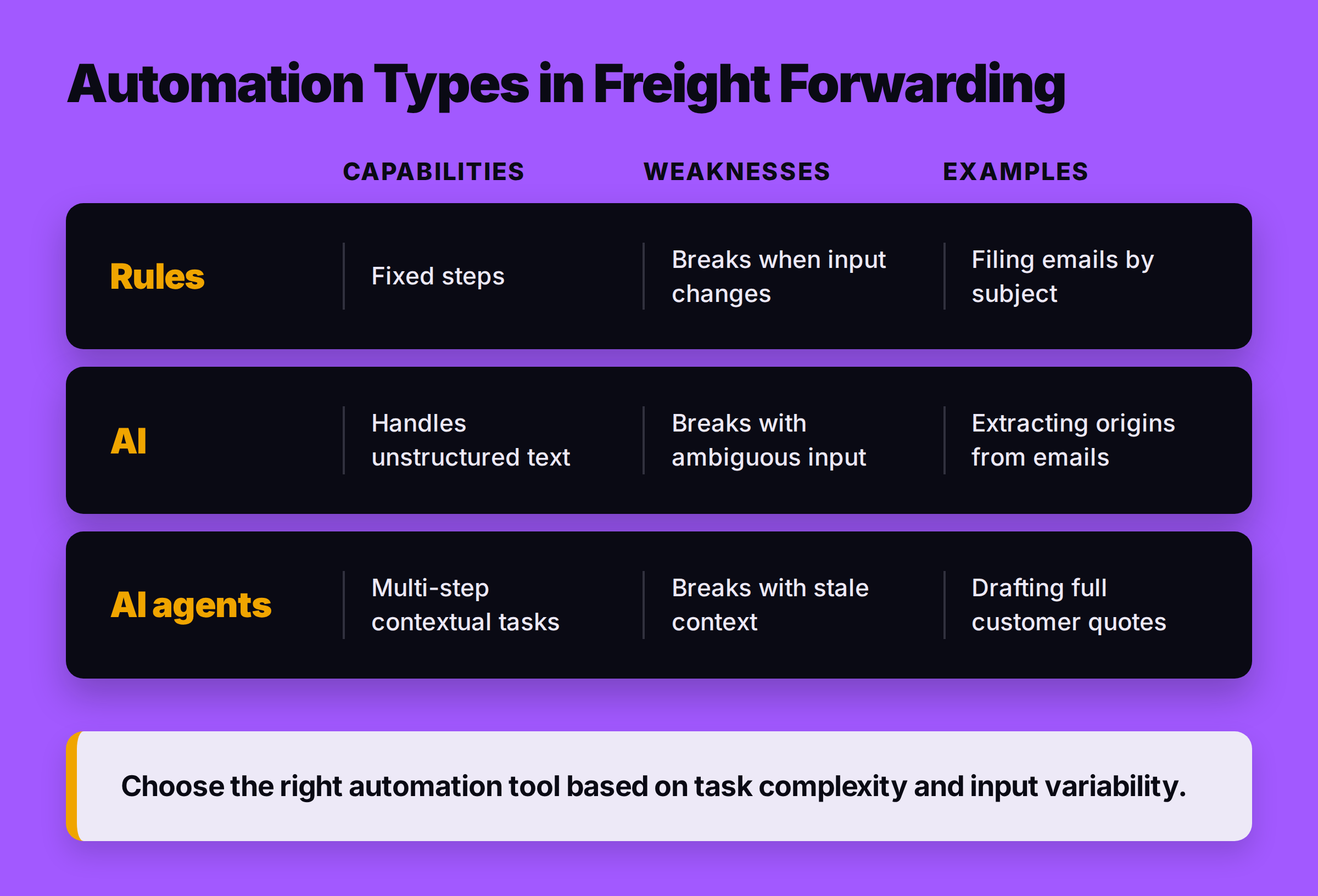
| Type | What it handles | Where it breaks | Example in a forwarding office |
|---|---|---|---|
| Rules | Fixed, predictable steps and formats. | When the input format or wording changes. | Automatically filing an email with a specific subject line. |
| AI | Variable, unstructured text and documents. | With ambiguous or poor-quality input. | Reading a customer's email to extract origin and destination. |
| AI agents | Multi-step tasks requiring context from other systems. | When it uses stale, incomplete, or wrong context. | Drafting a full customer quote by pulling rates and checking history. |
What to automate first
The question is not whether to automate, but what to automate first. The best place to start is where the work is most repetitive, the rules are clearest, and the cost of errors or delays is high. Here are the back-office workflows that usually pay back first, roughly in order.
1. Tracking replies ('where is my cargo?')
This is a high-volume, low-complexity task. Your customers ask for status updates constantly. The answer is usually already in the carrier's system or your TMS. Instead of having your team look up the status and type the same email over and over, automation can do it. The software can identify the shipment, pull the latest milestone from the carrier, and draft a standardized reply for your team to approve and send. This frees up your operations team to manage exceptions, not answer routine questions.
2. Enquiry reading and missing-information requests
Every quote starts with an enquiry. But customer enquiries are often incomplete. They might forget to mention the cargo weight, dimensions, or the Incoterms. Your team then has to go back and forth asking for the missing details. Automation can read the initial enquiry, extract all the information provided, and automatically draft a polite email asking for exactly what is missing. This standardizes your intake process and gets you the data you need to quote faster.
3. Pricing from your own rate cards
Once you have a complete enquiry, someone has to look up rates. This often involves checking multiple carrier spreadsheets or internal rate cards. Logistics automation software can connect to your rate sources, match the shipment details to the correct lane and service, apply your standard surcharges, and calculate a draft price. The system then hands a fully priced draft to your team. A person always approves the final quote before it goes to the customer, especially for key accounts or tight capacity situations, but the mechanical work of finding and calculating the rate is done.
4. Agent and carrier chasing
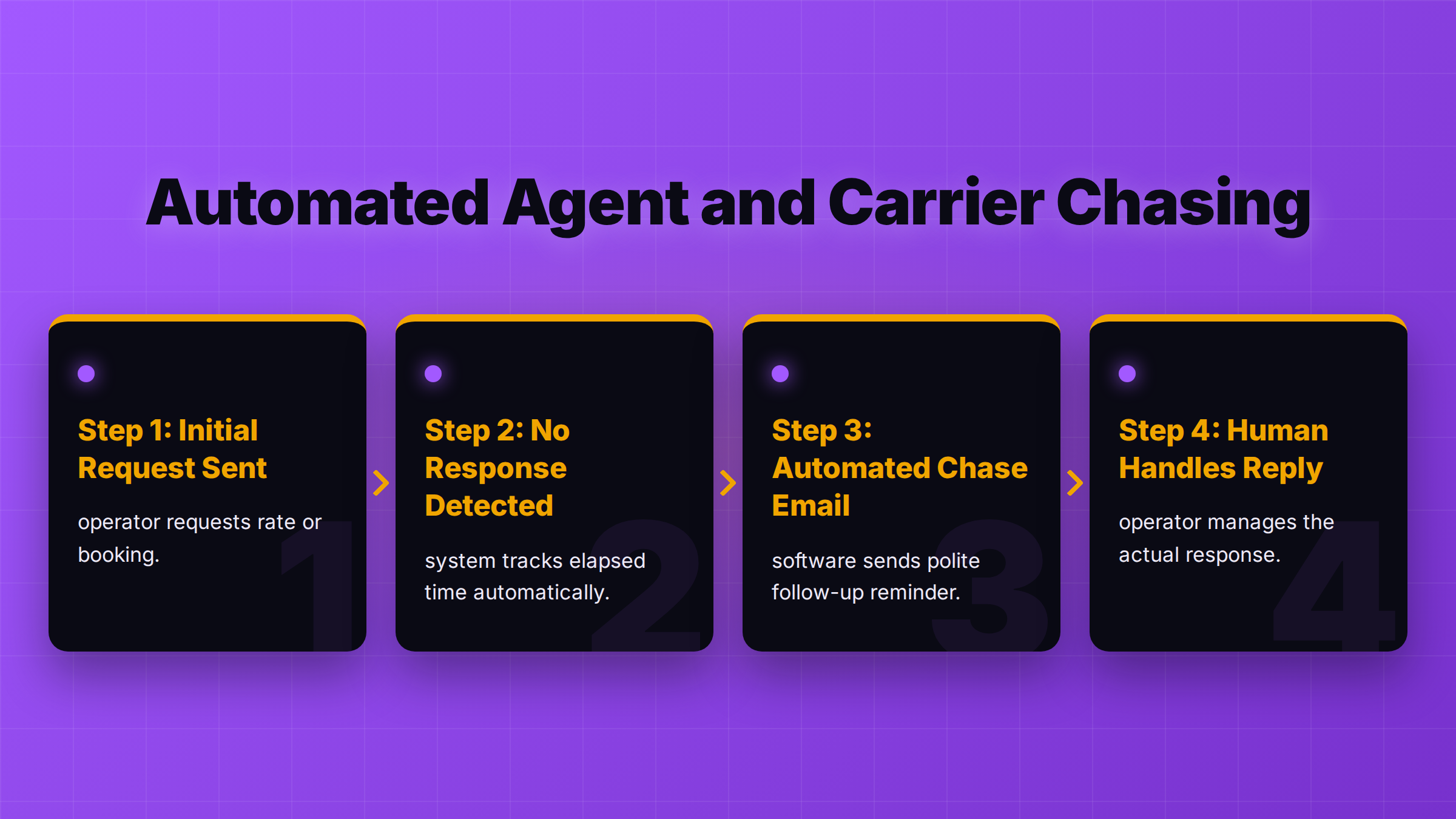
A huge amount of an operator's day is spent chasing. Chasing agents for rates. Chasing carriers for booking confirmations. Chasing partners for proof of delivery. This follow-up work is mechanical. An automation system can be configured to send reminders automatically after a set period of no response. The system tracks who has replied and who has not, ensuring nothing gets missed. The writing and sending of the chase email is automated; your team handles the reply when it arrives.
5. Carrier invoice checking
Reconciling carrier and vendor invoices against your job files is a critical but time-consuming finance task. Software can automate the first pass. It can read an incoming vendor invoice, match it to the correct job number, and compare the line items against the costs you approved or quoted. It then flags any discrepancies—like an unexpected surcharge or a wrong rate—for your finance team to review. This is often called vendor invoice reconciliation.
6. Payment reminders and follow-ups
Managing receivables is essential for cash flow. Automation can help by sending out systematic, polite reminders for upcoming and overdue invoices. You can set rules for when reminders are sent and what they say. As with all customer-facing communication, a person should approve the messages before they go out, but the system can prepare the drafts and manage the schedule.
What to keep with people
Automation is for tasks. It is not for relationships or judgement. Certain functions in a freight forwarding business should always have a person in control. The principle is simple: automate the preparation, but keep the approval.
Key areas for human control

- Pricing judgement: Deciding on a margin for a key account, or pricing a shipment when space is tight, requires commercial judgement. A system can calculate a price, but a person should make the final decision.
- Disputes with carriers: When you have a dispute with a carrier you depend on, the relationship matters as much as the money. A person needs to handle that negotiation.
- Customer relationships and escalations: If a customer's urgent shipment is rolled, they need to hear from a person, not a machine. Building trust and solving complex problems is human work.
- Customs filing: Customs declarations carry legal responsibility. This work stays with your authorized agent or broker.
- Committing money or liability: Any action that commits your company to spending money or accepting liability must be approved by a person. This includes approving a quote, accepting a carrier's invoice, or settling a claim.
How to start without a big-bang project
You do not need to replace all your systems or transform your company overnight. The most successful automation in freight forwarding starts small, with one defined workflow, and expands from there.
A step-by-step approach
- Pick one workflow. Choose a single, high-volume process, like handling booking confirmations or answering tracking requests. Take one real week of its messages and documents to understand the variations.
- Define your system of record. Decide which system holds the "truth" for each piece of data. Your TMS is likely the system of record for shipment details. Your accounting software is the record for invoices. The automation software should read from these systems and only write back approved, traceable updates.
- Define the approval point. Before you switch anything on, define the human gate. For example: "The system can draft a reply to a tracking query, but an operator must click 'approve' before it sends." This is the most important control you can build.
- Run it and check. Run the single workflow. See what changed for your team. Did it save them time? Did it create new problems? Solve those problems, get the first workflow running smoothly, and only then add the next one.
This incremental approach reduces risk and allows your team to adapt. To help you identify the best starting point for your business, you can use tools like the AI impact assessment. For a broader overview of available systems, see the freight forwarding software guide. To compare AI tools by the job they do, see the best AI tools for freight forwarders; for the bigger shift, see what a digital freight forwarder is. The whole picture is in AI in freight forwarding.
Questions to ask any automation vendor
When you evaluate logistics automation software, the sales demo will always look perfect. You need to ask questions that test how the system performs in the real world, with messy data and unexpected exceptions.
Critical evaluation questions
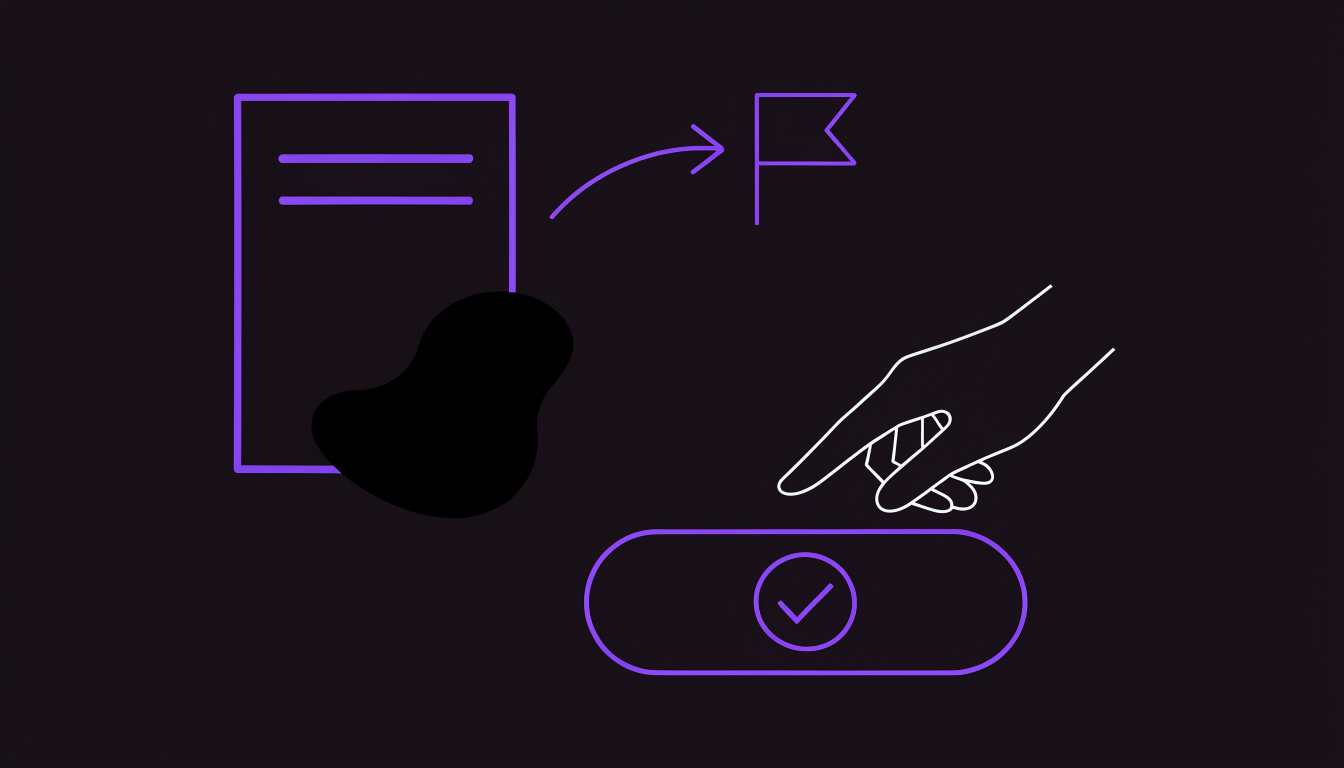
- What happens when the input is incomplete or unusual? Ask them to show you what the software does with a PDF that has a smudge on the container number, or an email with two different weights mentioned. A good system will flag the exception for a person to review, not guess the answer.
- Which actions wait for a person, and can we see that screen? The most important part of any automation system is the human approval screen. Ask to see it. It should clearly show the original document, the data the AI extracted, and what it recommends, so your team can make a fast, informed decision.
- What does it read from and write to our TMS and accounting system? Get a specific, field-level map of the integration. Vague promises of "integration" are not enough. You need to know exactly what data moves, in which direction, and who approves it.
- Can you run our own messages live? The ultimate test. Give the vendor a sample of your real emails and documents from the last week and ask them to run it through their system live on a call. This will show you more than any prepared demo.
Where FreighAI fits
FreighAI is an AI-first operations platform that runs the daily work of a forwarding company. It is designed as an automation layer that works alongside the systems you already have. You keep your TMS for the records; FreighAI runs the work around them.
Every email your company receives is read, understood, and turned into a task for the right person, with the answer already drafted. Your team approves every reply before it sends. For example, FreighAI spots what is missing in a new customer enquiry and drafts the email asking for it. When you need rates for a lane, it can email all your agents in one go, with the route and charge lines filled in, then automatically chase the ones who do not reply.
The goal is to handle the high volume of communication and coordination that lives in inboxes, so your team can focus on exceptions and customers. At Infinity Logistics, the same five-person team now handles 70% more shipments. You can learn more about how FreighAI works and see how you can automate one workflow on your own email.